
Choosing the right keyboard for 3D modeling in Blender comes down to how much desk space you have and how often you rely on custom macros. While some models offer dedicated dials for scrubbing through timelines, others focus on mechanical switch feel or programmable layouts to speed up your workflow.
As an Amazon Associate, we earn from qualifying purchases. This post contains affiliate links – if you buy through them, we may earn a commission at no extra cost to you.
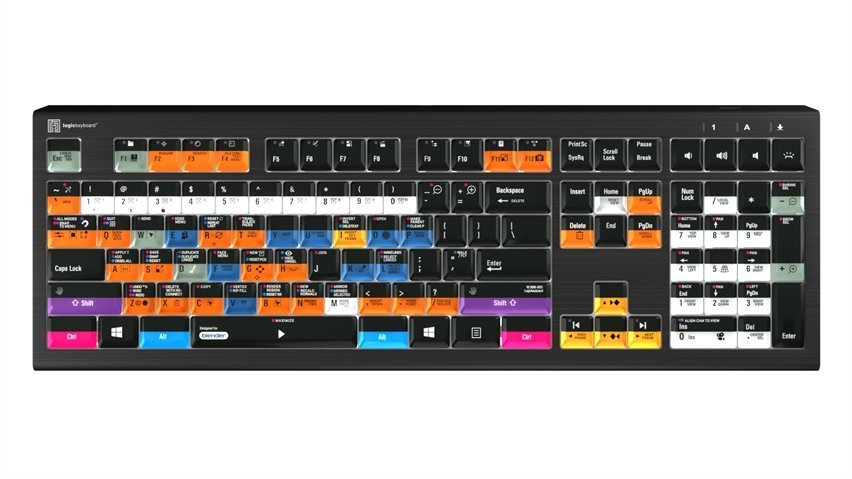
Best overall: Keychron K10 Max, because its QMK software lets you remap every key to specific Blender functions for a truly custom workflow. Best for shortcuts: Logickeyboard Blender Astra 2, which features over 140 pre-printed shortcuts specifically designed to help you navigate the Blender interface. Best for ergonomics: Logitech Wave Keys, which uses a wavy design and cushioned palm rest to keep your wrists comfortable during long sessions.
This guide is for 3D artists looking to improve their efficiency and comfort while using Blender.
How We Picked
We compared 16 different keyboard listings to find options that serve the unique needs of a 3D modeler. To make our list, each product had to clearly state its connectivity options, layout type, and any included software for macro customization. We excluded any keyboard that didn’t provide enough technical detail regarding its build materials or compatibility.
1. Logitech Craft Advanced Keyboard with Creative Input Dial

Best for: Creative workflow optimization
This keyboard features a unique creative input dial that allows you to adjust parameters in supported software. The keys are designed with spherical dishing for accuracy and blind navigation details.
The backlight automatically adjusts to your room’s lighting, which is helpful if you work late into the night. It’s a wireless model that uses encryption to maintain a secure connection up to 10 meters away. If you prefer a traditional mechanical feel, this keyboard might not be your first choice as it prioritizes a slim profile.
Pros
- Creative input dial for precise adjustments
- Automatically adjusting backlit keys
- Secure wireless encryption
Cons
- Lacks deep mechanical switch travel
2. 3Dconnexion Keyboard Pro with Numpad

Best for: Professional workstation integration
This is a full-sized keyboard that includes a detached numpad. The separation allows you to position your numeric input wherever it feels most natural on your desk.
Because it’s a full-sized unit, it provides a familiar layout for those who rely on the number pad for coordinate entry. It’s designed to integrate into professional workflows where space management is a priority. The listing doesn’t mention macro programming software.
Pros
- Detached numpad for flexible placement
- Full-sized layout for standard typing
Cons
- No built-in macro software
3. Logickeyboard Blender Astra 2

Best for: Shortcut-heavy Blender users
This keyboard is specifically labeled for Blender 3D, featuring over 140 shortcut icons printed directly on the keys. It includes a built-in USB 3.0 hub, which is useful for plugging in your mouse or a secondary input device without reaching for your computer tower.
The keys offer five levels of adjustable backlighting. The Logickeyboard Blender Astra 2 is plug-and-play with Windows 10/11. This board isn’t for users who want to customize their own key layout, as it’s pre-configured for standard Blender commands.
Pros
- Over 140 pre-printed Blender shortcuts
- Built-in USB 3.0 hub
- Five levels of backlighting
Cons
- Layout is fixed for Blender
4. Keychron K10 Max QMK Wireless Custom Mechanical Full-Size Keyboard

Best for: Full-size mechanical customization
The K10 Max is a 100% layout mechanical keyboard that supports QMK and the Keychron Launcher web app. You can remap any key or create complex macros, which is essential for streamlining your modeling process.
It features advanced acoustic foams that provide a responsive feel and a dampened sound profile. The hot-swappable PCB means you can change the switches later without soldering. This keyboard isn’t for someone who needs a compact, minimalist footprint.
Pros
- Fully programmable with QMK software
- Hot-swappable mechanical switches
- Three connection modes
Cons
- Large footprint takes up desk space
5. Keychron V5 Max Custom Wireless Mechanical Keyboard
Best for: Compact layout power users
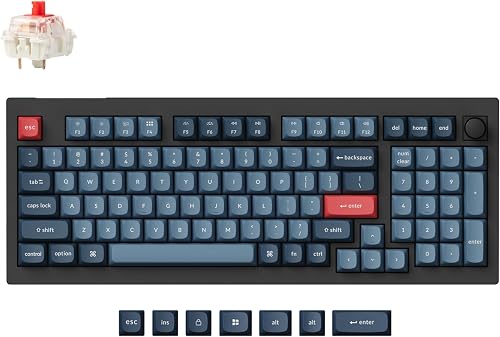
The V5 Max offers a 96% layout, which saves space while still keeping the number pad. It uses a gasket design and sound-absorbing foam to improve typing comfort during long sessions.
Like the larger models, it’s fully programmable via the Keychron Launcher web app. You can swap the switches easily if you decide to change the tactile feel later. It isn’t for users who require a dedicated row of function keys separated from the number block.
Pros
- Compact 96% space-saving layout
- Fully hot-swappable switches
- QMK software for custom macros
Cons
- Tight key spacing for some users
6. Das Keyboard 4 Professional Wired Mechanical Keyboard

Best for: Tactile feedback enthusiasts
This keyboard uses Cherry MX Blue switches, which provide a distinct click and tactile bump with every press. It also includes a dedicated volume knob and media controls for quick adjustments while you work.
The top is made of aluminum, and it comes with a magnetically detachable footbar to adjust the typing angle. It supports full N-Key Rollover, ensuring every command registers even during rapid-fire work. This board isn’t for those who need a silent typing environment, as the switches are quite audible.
Pros
- Tactile Cherry MX Blue switches
- Dedicated volume knob
- Sturdy aluminum top construction
Cons
- Very loud typing sound
7. AULA F75 Pro Wireless Mechanical Keyboard

Best for: Customizable mechanical performance
The F75 Pro features a 75% layout that includes a multi-function knob for controlling volume or lighting. Its “thocky” construction includes five layers of silencer filling to reduce cavity noise while you type.
The side-printed PBT keycaps are resistant to oil and sweat. It supports tri-mode connectivity, allowing you to switch between five different devices. This model isn’t for users who need a full number pad for data entry.
Pros
- Multi-function control knob
- Hot-swappable switch design
- Oil-resistant PBT keycaps
Cons
- No dedicated number pad
8. Logitech MX Keys Mini Minimalist Wireless Illuminated Keyboard
Best for: Minimalist desk setups
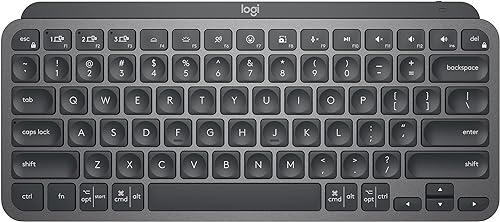
This is a compact, minimalist keyboard that focuses on precision and portability. It includes smart keys for dictation, mic muting, and emojis, which can be configured for other tasks.
The backlit keys sense your hands as they approach, lighting up only when needed to save battery. It connects to three devices via Bluetooth, making it easy to jump between your workstation and a laptop. This keyboard isn’t for users who prefer the deep travel and click of mechanical switches.
Pros
- Minimalist and portable design
- Smart proximity-based backlighting
- Multi-device Bluetooth connectivity
Cons
- Shallow membrane-style key travel
9. Logitech Wave Keys Ergonomic Wireless Keyboard with Palm Rest

Best for: Ergonomic wrist health
The Wave Keys uses a specific curved design to place your hands and wrists in a more natural position. It comes with a built-in memory foam palm rest that provides constant support during long modeling sessions.
It’s certified by United States Ergonomics and designed to reduce pressure on your wrists. You can use the Logi Options+ App to set custom shortcuts for your most-used Blender tools. This isn’t for users who want a high-profile mechanical keyboard with clicky feedback.
Pros
- Certified ergonomic design
- Cushioned memory foam palm rest
- Custom shortcut software support
Cons
- Not a mechanical keyboard
10. Redragon K719 PRO Wireless 95-Key Gasket Gaming Keyboard

Best for: Feature-rich compact setups
This keyboard stands out with a built-in TFT screen that displays battery life and connection status, or even custom GIFs. The gasket-mounted construction and lubed switches provide a soft, quiet typing experience.
It offers tri-mode connectivity and pro software for deep macro customization. The green-white finish offers a unique aesthetic compared to standard black boards. It isn’t for users who prefer a traditional, understated look.
Pros
- Built-in TFT customization screen
- Quiet, gasket-mounted typing
- Advanced macro software
Cons
- Unique colorway may not fit all setups
Other Worth Considering
The Redragon K689 RGB Gaming Keyboard offers a full 108-key layout with gasket mounting for those who want a larger workspace. The Redragon K745 RGB Gaming Keyboard provides a similar 108-key layout with added hotkeys for quick macro access. The Redragon K742 Mechanical Gaming Keyboard features a dedicated knob for media control and a standard mechanical layout.
How to Choose the Best Blender Keyboard
Does layout size matter for Blender?
Yes, the layout size impacts your efficiency. A full-sized keyboard with a number pad is useful for entering precise coordinates, while a 75% or 96% keyboard saves desk space for your mouse. If you don’t use the number pad for modeling, a smaller board allows you to keep your mouse closer to your keyboard, which is better for arm posture.
Why choose mechanical over membrane?
Mechanical keyboards offer consistent tactile feedback that helps you feel each keypress, which is useful when you’re performing many keyboard shortcuts. Many mechanical boards also offer hot-swappable switches, allowing you to change the feel later. Membrane keyboards, like those from Logitech, are often quieter and thinner, which is better for shared office spaces.
Should I look for macro software?
Macro software allows you to remap keys to specific Blender commands, such as switching views or applying modifiers. If you use custom tools, look for boards that support QMK or manufacturer-specific software. This allows you to turn a standard key into a powerful shortcut that saves you time during your creative process.
Related guides
- 10 Best Blender YouTube Channels for Modeling in 2024
- 10 Best Blender Addons for Modeling: Our Expert Picks
- 10 Best Keyboards for Blender to Improve Your Workflow
Frequently Asked Questions
Can I use these keyboards with both Windows and Mac?
Most of the keyboards on this list support both operating systems, though you should check the specific listing for system toggles. Keyboards like the Keychron V5 Max include specific keycaps for both Windows and macOS layouts. If you switch between platforms, ensure the keyboard allows for quick connection switching via Bluetooth or a dedicated mode toggle.
What happens if a mechanical switch fails?
On hot-swappable keyboards like the AULA F75 Pro or Keychron K10 Max, you can simply pull the faulty switch out and plug in a new one. This saves you from needing to buy a new keyboard or perform difficult soldering. You should confirm if your chosen model supports 3-pin or 5-pin switches to ensure compatibility with replacement parts.
Is the simplest keyboard enough for 3D work?
A simple keyboard is enough if you primarily use your mouse for modeling. However, as your workflow grows, you’ll likely find that having programmable keys or a dedicated number pad speeds up your work. The Logickeyboard Blender Astra 2 is a great example of how specialized hardware can simplify complex software navigation by putting shortcuts right under your fingers.
What maintenance is required for these keyboards?
Regular maintenance involves keeping the keycaps clean and ensuring no debris falls into the switches. For keyboards with PBT keycaps like the Keychron K10 Max, the material resists oil and shine. If you use a mechanical board, you may occasionally need to use a keycap puller to remove dust from the plate underneath.
Closing
For most Blender users, the Keychron K10 Max is the top choice because its QMK software allows for total customization of your shortcut keys. If you prefer a smaller desk footprint, the Keychron V5 Max provides similar features in a 96% layout. Start by identifying which Blender shortcuts you use most often, then choose a keyboard that makes those commands easy to reach.