
Finding the best free 3d software for begginers isn’t about picking one single tool that does everything. It’s about matching the software’s specific strengths to your creative goals, whether you want to design a house, build a game, or learn professional animation. Your choice often comes down to how much time you want to spend learning a complex interface versus how quickly you need to see results. While DreamPlan Home Design is ideal for quick home mockups, Blender 3D is better for those who want to master a complete professional-grade production suite.
As an Amazon Associate, we earn from qualifying purchases. This post contains affiliate links – if you buy through them, we may earn a commission at no extra cost to you.
1. DreamPlan Home Design

Best for: Someone who wants to visualize a home renovation project quickly.
This software is built for users who need to see their ideas in 3D without a steep learning curve. You can switch between 2D blueprints and 3D views to ensure your walls, roofs, and decks are positioned correctly. It simplifies the design process by letting you drag and drop furniture and appliances into your rooms.
The terrain tools allow you to plan outdoor landscaping, including gardens and trees. It’s a great choice if you aren’t looking to become a professional 3D artist but just want to see how your living space could look. If you need advanced animation or complex character modeling, this software isn’t for you, as it focuses strictly on home and landscaping design.
Good if:
- You’re planning a home renovation.
- You need to design outdoor landscaping.
- You want a simple interface for 3D floors.
Skip it if:
- You want to animate 3D characters.
- You need professional game engine tools.
2. Sweet Home 3D
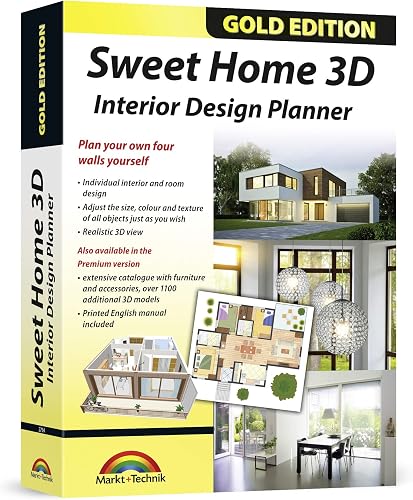
Best for: Users who want a large library of furniture to decorate rooms.
This tool is designed for people who focus on interior planning. The inclusion of 1100 additional 3D models means you have a wide variety of furniture and accessories to choose from right away. You can change the texture, color, and size of every item to match your specific vision.
The software gives you an instant 3D view, which helps you see changes without waiting for the program to render. It’s a solid choice for architects or homeowners who want to plan an apartment layout. If you need to design complex outdoor terrain or professional-grade movies, this tool may feel limited because it’s tailored specifically for room and interior design.
Good if:
- You enjoy customizing furniture and textures.
- You need a large library of objects.
- You want to see changes in real-time.
Skip it if:
- You require advanced landscape sculpting tools.
- You’re looking for a general-purpose 3D modeler.
3. Total 3D Home Suite

Best for: Windows users who need a dedicated suite for home and deck projects.
This suite is built to handle home, landscape, and deck projects on modern Windows operating systems. It provides a structured environment for users who are working on specific structural planning tasks.
Because this software is focused on the home and landscape niche, it simplifies the workflow for non-technical users. It doesn’t offer the general 3D creation tools found in broader software packages. If you’re looking to do character animation or complex artistic modeling, you should look elsewhere.
Good if:
- You use a Windows 11, 10, or 8 computer.
- You’re focused on home and deck planning.
Skip it if:
- You’re using a Mac.
- You want to create 3D animations.
4. Spacedraw

Best for: Someone who wants to work on 3D models while on the go.
Spacedraw is built for mobile modeling, allowing you to create and edit 3D content directly on a mobile device. This is a niche tool for those who don’t want to be tethered to a desktop computer.
Since it’s designed for a mobile interface, it’s best for quick sketches or simple model adjustments. It isn’t intended for heavy-duty rendering or complex, multi-layered movie production.
Good if:
- You want to model on a mobile device.
- You need a portable 3D solution.
Skip it if:
- You need a full-screen desktop experience.
- You’re building high-end interactive games.
5. Ready Game Creator

Best for: Beginners who want to start their journey into game development.
The listing doesn’t mention the features or purpose of Ready Game Creator. It helps users who want to build interactive experiences rather than just static 3D models.
This software is for those who are interested in game logic and environment interactivity. It isn’t the right choice if your primary goal is architectural design or high-quality product rendering.
Good if:
- You’re interested in game development.
- You want to build interactive 3D worlds.
Skip it if:
- You want to design interior spaces.
- You’re focusing on traditional 3D art.
6. Pivot 3D VR Free

Best for: Creators who want to work within virtual reality environments.
This software is a unique option for those who find traditional flat-screen modeling limiting.
It’s a specialized tool for VR enthusiasts. If you’re looking for a standard modeling suite for traditional 3D animation, this may not provide the feature set you expect.
Good if:
- You’re interested in VR environments.
- You want an immersive design experience.
Skip it if:
- You prefer traditional desktop modeling.
- You need professional animation tools.
7. Blender – 3d Design and Animation Software (Download)
Best for: Students and artists who want to learn professional 3D skills.
Blender 3D is a powerful suite that allows you to handle everything from modeling and texturing to rendering and post-production. It’s used by professionals to create high-quality animations and broadcast-ready graphics.
It’s a complex program, so it isn’t for those who want a simple, “instant” design experience. You’ll need to invest time in learning its many features to get the most out of it.
Good if:
- You want to master professional-grade 3D software.
- You need a complete suite for animation.
- You want to export high-quality movies.
Skip it if:
- You want a simple, one-click home planner.
- You have very little time to learn software.
Best Free Software for Beginners
The software covered here splits into two main camps: specialized planning tools and general creative suites. Programs like DreamPlan Home Design, Sweet Home 3D, and Total 3D Home Suite overlap significantly; they all focus on architectural visualization and home layout. If you’re primarily interested in interior design, the choice between these often comes down to which interface you find more intuitive or which library of furniture you prefer. Conversely, Blender 3D stands apart as the only professional-grade suite that supports the entire creative pipeline. While the others are for specific tasks, Blender is for those who want to build a career in 3D art.
Still Not Sure?
How often will I really use it?
If you only have one specific home project in mind, you don’t need a professional suite. A simpler tool like DreamPlan Home Design will get the job done quickly without forcing you to learn complex animation tools. You’ll save time by choosing a program that matches your specific goal.
What do I already own that this has to work with?
Check your computer’s operating system before deciding. If you’re on a Mac, you need to ensure the software is compatible, as some titles like Total 3D Home Suite are built specifically for Windows. Always confirm the system requirements to avoid disappointment after you start the download process.
What am I most likely to regret choosing?
You might regret choosing a professional-grade tool like Blender 3D if you only want to design a quick room layout. The learning curve is steep, and you might feel overwhelmed by features you don’t need. Stick to the simpler planners if you just want to see how your furniture fits in your home.
Related guides
Frequently Asked Questions
Can I use this software to design for 3D printing?
Most professional 3D printing workflows require software that can export files in formats like STL or OBJ. The Blender Foundation provides a comprehensive suite that supports these industry-standard formats, making it the most suitable choice among these options for preparing complex models for 3D printing.
Is it hard to learn 3D modeling for the first time?
The difficulty depends on your goal. If you use a home design tool, you can often start creating within minutes. If you choose a professional suite like Blender 3D, expect a much longer learning process. Specialized tools offer a more streamlined feature set than a full suite.
Can I import my own furniture into these programs?
Some programs allow for imports, while others rely on their own libraries. Sweet Home 3D specifically lists the ability to import your own 3D models and textures, which is a great feature if you have specific items you want to see in your design. Always check if the software supports your file types.
Do I need a powerful computer to run these?
Home design software usually runs on standard hardware. However, rendering high-quality animations or complex 3D scenes in a program like Blender 3D can be demanding on your processor and graphics card.
If your main goal is home renovation, choose DreamPlan Home Design to get started immediately. If you want to build a long-term skill in animation and design, download Blender 3D and start learning the basics today.
Conclusion
The most important thing is to just start creating. Don’t worry about picking the perfect program right away, because you’ll learn more by experimenting than by reading reviews. Download one of these tools today, open a simple tutorial, and see what you can build. You’ll be surprised at how quickly your skills grow.