
As an Amazon Associate, we earn from qualifying purchases. This post contains affiliate links, and buying through one costs you nothing extra.
Choosing the right hardware for Redshift rendering depends on your specific workload and scene size, with the NVIDIA RTX 6000 Blackwell leading for massive assets and the ASUS ROG Astral 5090 for standard projects. Because Redshift is GPU-accelerated, core counts and memory bandwidth determine your final frame speeds.
1. NVIDIA RTX 6000 Blackwell

Best for: Professionals handling massive, complex 3D scenes and local AI modeling.
The RTX 6000 Blackwell is built for extremes. With 96GB of GDDR7 memory, it’s designed for artists who can’t afford to hit memory limits during a render. The double-flow-through cooling design manages the 600W power load, ensuring the card stays stable during long, multi-day render jobs.
This card isn’t for the hobbyist or the occasional renderer. Its specific export requirements make it a specialized tool. If your projects fit comfortably within 16GB or 24GB of memory, the massive capacity here would be underutilized.
Good if:
- You work with massive datasets that exceed standard VRAM limits.
- You need ECC memory to ensure data accuracy for long renders.
- Your workflow integrates local LLM fine-tuning alongside 3D design.
Skip it if:
- You’re a freelance artist working on standard-sized projects.
- You need a card that doesn’t require special regulatory compliance for purchase.
2. PNY VCNRTXA6000-PB NVIDIA 48GB GDDR6 Graphics Card

Best for: Artists requiring large VRAM buffers on a proven architecture.
The PNY NVIDIA RTX A6000 provides 48GB of GDDR6 memory. This memory capacity is a significant advantage for Redshift users who deal with high-polygon geometry and 8K textures. It remains a choice for professionals who prioritize capacity over the latest generation’s speed.
This card uses the PCIe 4.0 interface. While still very capable, it lacks the bandwidth of the newer PCIe 5.0 cards. It isn’t the right choice for someone building a top-of-the-line system that demands the absolute latest connectivity and memory standards.
Good if:
- You need a large VRAM buffer for heavy textures and geometry.
- You prefer a card with a long track record in professional environments.
- You need a 3-year manufacturer warranty to ensure long-term hardware support.
Skip it if:
- You want the fastest possible memory bandwidth for real-time simulation.
- You’re building a system centered on PCIe 5.0 hardware.
3. NVIDIA RTX PRO 4000 Blackwell Graphics Card

Best for: Efficient, high-performance professional workstations.
The NVIDIA RTX 4000 Blackwell brings the new architecture into a more accessible professional form factor. With 24GB of GDDR7 memory, it balances speed and capacity for most professional 3D workflows. Its single-slot design makes it easier to fit into tighter workstation chassis than the bulkier 6000 series.
This card is optimized for professional stability rather than raw gaming performance. If you’re a user who expects high-frame-rate gaming as a secondary use, the professional driver set and cooling design aren’t tuned for that purpose.
Good if:
- You need a professional-grade card that fits in a standard workstation.
- You want the latest Blackwell architecture for Redshift performance.
- You need ECC memory to protect against render errors.
Skip it if:
- You regularly work with scenes that require more than 24GB of VRAM.
- You’re looking for a card primarily for high-refresh-rate gaming.
4. GIGABYTE GeForce RTX 5080 Gaming OC 16G Graphics Card

Best for: Enthusiasts who want peak speed for daily rendering.
The GIGABYTE RTX 5080 Gaming leverages the Blackwell architecture to deliver fast frame processing. The 16GB of GDDR7 memory is sufficient for most standard 3D scenes, and the WINDFORCE cooling system keeps the card cool during heavy render sessions.
This card is designed for performance, not for massive memory-intensive tasks. If your work involves complex simulations that frequently push beyond 16GB, you’ll find yourself limited by the memory capacity. It’s a powerful tool, but it lacks the ECC memory found in the professional workstation lines.
Good if:
- You prioritize rendering speed for standard, complex 3D projects.
- You want the latest Blackwell architecture in a consumer-ready package.
- You prefer a highly optimized cooling system for sustained performance.
Skip it if:
- You work with massive datasets that require more than 16GB of VRAM.
- You need ECC memory for mission-critical, long-duration rendering.
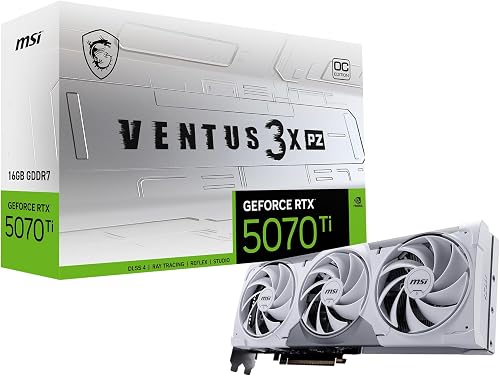
5. msi Gaming RTX 5070 Ti 16G Ventus 3X PZ OC
Best for: Balanced performance in smaller workstation builds.
The MSI RTX 5070 Ti Ventus is a compact, high-performance option. Its TORX Fan 5.0 and nickel-plated copper baseplate ensure that heat is managed effectively, even in SFF (Small Form Factor) cases. It is an option for creators who need a card that doesn’t take up excessive space.
This card isn’t intended for users who demand the highest possible ceiling for VRAM. While 16GB is excellent for many tasks, it isn’t a “future-proof” amount for those expecting to move into extremely large-scale scene production.
Good if:
- You have a smaller workstation case and need efficient thermal management.
- You want a balance of speed and power consumption.
- You need modern connectivity like DisplayPort 2.1a.
Skip it if:
- You need the absolute highest VRAM capacity currently available.
- You’re building a full-sized tower and don’t need SFF-ready components.
6. Nvidia RTX 2000 ADA 16GB Graphics Card

Best for: Compact workstations where space is the primary constraint.
The NVIDIA RTX 2000 Ada is a unique, half-height card designed to fit where nothing else will. Despite its size, it provides 16GB of ECC memory, making it surprisingly capable for professional rendering and design work in tight spaces.
This card isn’t a powerhouse for high-speed, heavy-duty rendering. Its blower-style fan is effective at exhausting heat out of a small case, but it can’t match the raw throughput or thermal capacity of a full-sized card.
Good if:
- You’re limited by a very small or low-profile PC chassis.
- You need a professional card with ECC memory for reliability.
- You need a power-efficient solution for your workstation.
Skip it if:
- You have space for a full-sized, multi-fan graphics card.
- You need top-tier rendering speed for large-scale production.
7. ASRock Intel Arc Pro B60 Creator 24GB Graphics Card

Best for: Users integrated into Intel-based professional ecosystems.
The ASRock Intel Arc Pro B60 offers a massive 24GB of GDDR6 memory. It’s a specialized workstation card that includes dedicated support for AI acceleration through its XMX engines. The blower-style cooling is designed for consistent airflow in professional workstation environments.
This card is built for specific professional software workflows and ISV-certified environments. If your primary goal is to use software that isn’t optimized for Intel’s architecture, you may find the performance less predictable than on NVIDIA-based cards.
Good if:
- You need 24GB of VRAM for rendering and AI tasks.
- You require ISV-certified drivers for specific design software.
- You want a card that handles AV1 and other modern video codecs.
Skip it if:
- Your software stack is exclusively optimized for NVIDIA CUDA cores.
- You prefer standard dual-fan cooling over a blower-style system.
8. PNY RTX PRO 6000

Best for: Users who want the highest VRAM capacity available.
The PNY RTX PRO Max-Q edition is the top-tier option for memory-hungry workflows. With 96GB of GDDR7, it essentially removes the VRAM ceiling for almost any 3D project. The dual-fan design is built to maintain performance under the most demanding professional conditions.
This is a massive investment and a very large card. It isn’t suitable for anyone who doesn’t explicitly require the extra memory headroom. If your scenes aren’t hitting the memory limits, the extra capacity will go unused.
Good if:
- You’re a professional working with extremely large-scale environments.
- You need the highest possible VRAM available on the market.
- You want a professional-grade card with the latest memory standards.
Skip it if:
- You aren’t consistently working with massive 3D scenes.
- You have a smaller workstation case that can’t support high-end, full-sized cards.
9. ASUS ROG Astral GeForce RTX 5090 OC Edition Quad Fan

Best for: Ultimate speed and AI-assisted content creation.
The ASUS ROG Astral 5090 is a powerhouse, featuring 32GB of GDDR7 and an impressive 3352 AI TOPS. It’s designed for creators who need both extreme rendering speed and the ability to run large-scale local AI models for denoising or upscaling. The quad-fan cooling and vapor chamber ensure it stays cool.
This is a very large card that requires significant physical space and power. It isn’t for anyone who values a quiet, compact, or low-profile build. You must ensure your power supply can handle the card’s requirements.
Good if:
- You want the fastest possible rendering performance for your projects.
- You need 32GB of VRAM for multitasking across AI and 3D apps.
- You want a card that includes a support holder to prevent sag.
Skip it if:
- You have a limited power supply or a compact PC case.
- You don’t need the additional AI acceleration features.
10. PNY VCNRTXPRO4500B-PB NVIDIA RTX PRO 4500 Blackwell 32GB GDDR7 256B

Best for: Professional balance of core count and VRAM.
The PNY RTX PRO 4500 Blackwell is a strong middle ground for professional workstations.
This card is intended for professional use cases. If you don’t require ECC memory or the professional driver certification, other cards might offer more speed for your specific needs.
Good if:
- You need 32GB of ECC memory for professional stability.
- You want a balance between high-end professional features and performance.
- You work in an environment that relies on certified drivers.
Skip it if:
- You need the absolute maximum 96GB capacity for massive scenes.
- You’re looking for a consumer-focused card for gaming.
Choosing the Best GPU for Redshift
Most of these cards share the Blackwell architecture, which provides consistent performance benefits for Redshift users. The mid-range options, such as the PNY RTX PRO 4500 and the NVIDIA RTX 4000 Blackwell, are quite similar in their professional focus and 24GB-32GB memory range. Choosing between them often comes down to your preferred brand’s cooling design and your specific chassis requirements. On the other hand, the top-tier flagship cards and the ASUS ROG Astral 5090 stand apart due to their massive memory buffers and focus on high-end AI inference. If your project files are small, the performance difference between these cards is often smaller than the difference in physical size and power requirements.
Still Not Sure?
How often do I really use it?
If you render every single day for professional clients, the professional-grade cards like the PNY RTX PRO 4500 offer the ECC memory and stability you need. If you’re an occasional hobbyist, a consumer-focused card like the GIGABYTE RTX 5080 Gaming provides excellent speed without the specialized professional-grade certifications.
What do I already own that this has to work with?
Check your power supply capacity and the physical length of your case. For compact builds, the NVIDIA RTX 2000 Ada is a perfect fit. If you have a massive tower and a high-wattage power supply, you can consider the ASUS ROG Astral 5090 or the PNY RTX PRO 6000.
What am I most likely to regret choosing?
You’ll regret buying a card with too little VRAM if your scenes are large. If you work on complex architectural visualizations or large-scale environments, don’t skimp on memory. Always check the NVIDIA RTX Workstation GPU specifications to ensure the card you choose meets your project’s minimum memory requirements.
Choosing the right GPU for Redshift comes down to your VRAM needs and your available space. For extreme professional projects, the highest-end NVIDIA workstation card is the top choice. For those needing a balance of power and space, the MSI RTX 5070 Ti Ventus is a great path forward. Check your case clearance before ordering.
Frequently Asked Questions
Does the GPU architecture affect Redshift render times?
Yes, the architecture is fundamental to render speed. Newer architectures like Blackwell introduce more efficient streaming multiprocessors and faster ray-tracing cores, which directly reduce render times in Redshift. The PNY RTX PRO 4500 and ASUS ROG Astral 5090 utilize these newer designs to handle complex lighting calculations more efficiently than older generations.
Is ECC memory necessary for 3D rendering?
ECC memory isn’t required for rendering, but it’s highly recommended for professional work. It detects and fixes memory errors that can cause a long render to crash or produce artifacts. Professional cards like the PNY RTX PRO 4500 and the top-tier NVIDIA workstation offering include this feature for added reliability.
How do I know if my PC case can fit these GPUs?
You must verify the physical dimensions, specifically the length and slot width, against your case specifications. The NVIDIA RTX 2000 Ada is designed for small cases, while the ASUS ROG Astral 5090 is a large card requiring significant clearance. Always check the manufacturer’s manual for your specific computer chassis.
Can I use a consumer GPU for professional Redshift rendering?
Yes, you can use consumer cards like the GIGABYTE RTX 5080 Gaming for professional rendering. They provide excellent performance for many tasks. However, they lack professional features like ECC memory and ISV-certified drivers, which are preferred in mission-critical studio environments where stability is the absolute highest priority.
Conclusion
Upgrading your hardware is a big decision, but it shouldn’t feel overwhelming. Once you’ve settled on the card that fits your budget, keep an eye on your cooling setup to ensure everything runs smoothly. You’ll be surprised at how much faster your renders look when your system isn’t struggling to keep up.