

Producing a high-quality how to make coffee video takes about 2 to 3 hours of filming and editing for a short 60-second clip. This project is considered medium difficulty, as it requires basic camera stability and a clear understanding of lighting. You must have a tripod or a stable surface to keep your shots steady before you start.
Gathering your coffee video gear
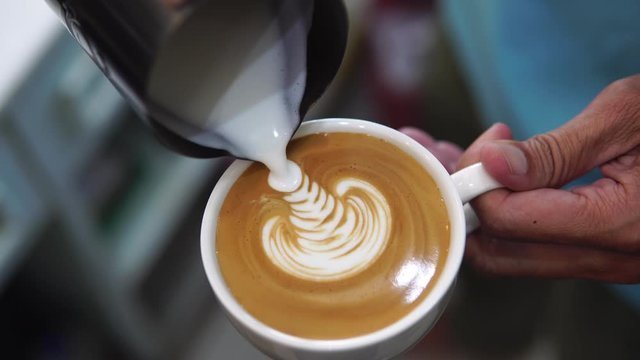
| Item | How much | Why it’s needed | A substitute |
|---|---|---|---|
| Camera | 1 unit | Captures clear video | Modern smartphone |
| Tripod | 1 stand | Prevents shaky footage | Stack of books |
| Lighting | 2 sources | Removes harsh shadows | Window daylight |
| Coffee | 30 grams | Visual focus of video | None — don’t swap |
| Backdrop | 1 surface | Provides clean background | Plain kitchen wall |
| Editing software | 1 program | Trims and clips video | Mobile video app |
Preparation for Filming
- Turn off all ceiling fans and air conditioners to prevent unwanted noise and movement during recording.
- Clear your workspace of all unnecessary items so the viewer focuses only on the coffee preparation.
- Wipe down your coffee equipment to ensure it looks clean and professional under bright lights.
- Charge your camera or phone to at least 80% to avoid power failure during the filming process.
- If you’re filming near a stove, ensure all handles are turned inward; the USDA Food Safety and Inspection Service provides guidelines on maintaining a safe kitchen environment while working.
Filming Your Coffee Process
- Set your tripod on a flat, stable surface 2 feet from your coffee station to ensure the framing remains consistent for every shot.
- Position your primary light source at a 45-degree angle to the side of your coffee station to highlight the texture of the grounds.
- Record a 10-second clip of measuring the beans to establish the starting quantity, ensuring the scale reading is visible to the camera lens.
- Film the grinding process for 15 seconds, focusing on the change in texture from whole beans to fine grounds for the viewer to see.
- Record the water pouring action for 20 seconds, keeping the camera steady to capture the bloom of the coffee as it hits the filter.
- Capture a 5-second close-up of the final coffee dripping into the carafe to show the finished consistency and rich color of the brew.
- Move your camera to a secondary angle for a 10-second shot of you pouring the coffee into a mug to show the final result.
- Transfer your clips to a computer or mobile editing app to trim the excess footage and ensure each transition is smooth and quick.
Signs of Success

A successful video features clear, sharp images where the coffee grounds and liquid are in focus at all times. The audio should be free of background hums or sudden loud noises. If the footage looks dark or grainy, you need a second round of filming with more natural light or a brighter lamp. You know it worked when the timing of each step flows naturally and the viewer can clearly see the measurement and the final pour.
Troubleshooting Common Issues
| What happened | Why | What to do |
|---|---|---|
| Shaky video | No tripod used | Use a tripod |
| Dark footage | Poor lighting | Add extra lamp |
| Blurry focus | Auto-focus error | Lock focus manually |
| Too long | Too much filler | Trim each clip |
| Quiet audio | Mic obstructed | Use external mic |
Frequency of Content Creation
You should aim to produce one new video every two weeks to keep your audience engaged and interested. This frequency changes based on your available editing time and the complexity of the brewing method you’re showcasing. If you’re filming complex latte art, allow for an extra hour of setup; if you’re filming a simple pour-over, you can likely finish the entire process in under 90 minutes.
Frequently asked questions

How long should a coffee video be?
A coffee video should be 60 seconds long to maintain viewer interest while providing enough time to show the full process clearly. Anything longer often leads to viewer drop-off.
Is it safe to film near boiling water?
It’s safe to film near boiling water if you use a tripod to keep your hands away from the heat and ensure all equipment is placed on a heat-resistant surface.
How do I stop my video from looking yellow?
You stop the yellow tint by adjusting the white balance setting on your camera to match your specific light source, such as tungsten or daylight settings.
What happens if the video is out of focus?
If the video is out of focus, the viewer can’t see the texture of the grounds, which is a key part of showing the quality of the coffee.
Does the camera angle matter?
The camera angle matters because it dictates how much of the brewing process the viewer can see; a top-down view is often best for showing measurements.
Can I use music in my video?
You can use music in your video as long as you have the legal right to use the track or use royalty-free music from a verified library.
How much space do I need for filming?
You need about 3 feet by 3 feet of clear table space to comfortably set up your camera, coffee equipment, and lighting for a professional-looking shot.
Conclusion
Creating engaging video content is a skill that improves with every attempt. Focus on clear lighting and steady shots to ensure your audience can follow your steps without distraction, and always double-check your focus before you start the main recording.